MQTT Connect
Connect to an MQTT broker. This action opens a session that can later be used by MQTT Publish, MQTT Subscribe, MQTT Unsubscribe and MQTT Disconnect.
Action available for the following operating systems:

Parameters
General
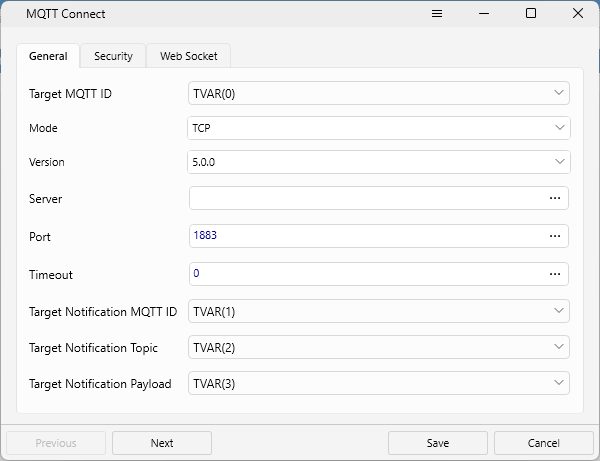
- Target MQTT ID <numeric> - The identifier that will be assigned to this MQTT connection. The same identifier must be used in the other MQTT actions to refer to this session.
- Mode <unquoted string> - The transport protocol used for the connection:
- TCP - Standard MQTT over TCP.
- TCP(TLS/SSL) - MQTT over a TLS/SSL encrypted TCP connection.
- WebSocket - MQTT over WebSocket.
- WebSocket(TLS/SSL) - MQTT over a secure WebSocket connection.
- Version <unquoted string> - The MQTT protocol version to use (e.g.
3.1.1,5.0.0). - Server <string> - The host name or IP address of the MQTT broker.
- Port <numeric> - The port of the MQTT broker. Default is
1883for plain TCP and8883for TLS/SSL. - Timeout <numeric> - The connection timeout in milliseconds. The value
0means no timeout. - Target Notification MQTT ID <numeric> - Target variable that receives the MQTT ID of the connection that raised the notification when a message is received. Used by the MQTT Message received event.
- Target Notification Topic <string> - Target variable that receives the topic of the received message.
- Target Notification Payload <string> - Target variable that receives the payload of the received message.
Security
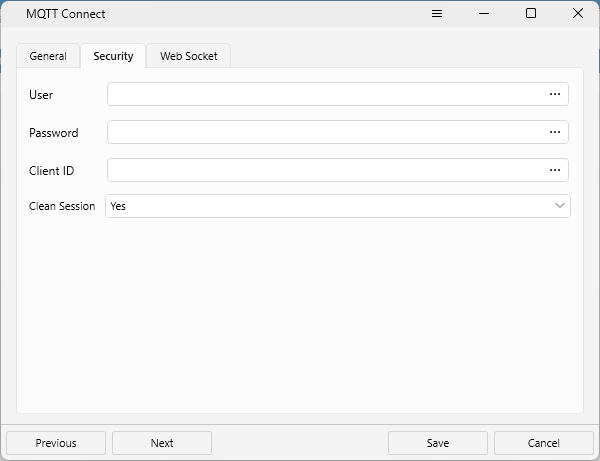
- User <string> - The username used to authenticate with the broker. Leave empty if the broker does not require authentication.
- Password <string> - The password used to authenticate with the broker.
- Client ID <string> - The MQTT client identifier. If empty, a random identifier is generated.
- Clean Session <unquoted string> - Defines whether the broker keeps the client's session state between connections:
- Yes - The broker discards any previous session and starts a fresh one.
- No - The broker keeps subscriptions and queued messages from a previous session with the same Client ID.
Web Socket
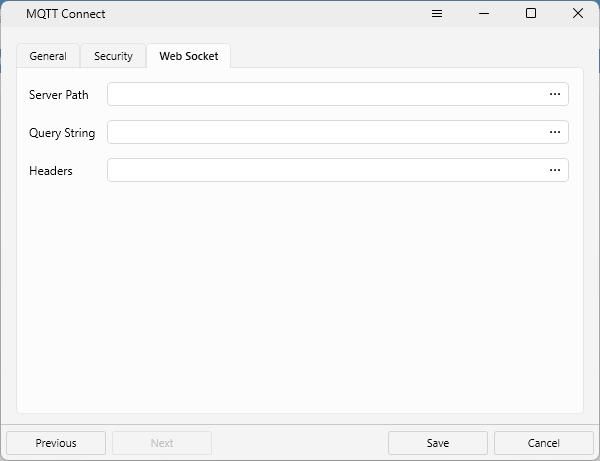
Only applies when Mode is set to WebSocket or WebSocket(TLS/SSL).
- Server Path <string> - The path appended to the server URL for the WebSocket endpoint (e.g.
/mqtt). - Query String <string> - Optional query string appended to the WebSocket URL.
- Headers <string> - Optional HTTP headers sent during the WebSocket handshake, separated by CR.
When using WebSocket(TLS/SSL), the broker must present a valid TLS certificate. Kalipso does not generate certificates — they must be obtained from a Certificate Authority or generated externally (for example, a self-signed certificate) and installed on the broker. The client device must also trust the certificate, either through the operating system's trust store or by importing it as a trusted root CA.
To receive messages from the broker after a successful connection, use the MQTT Subscribe action to subscribe to a topic and handle incoming messages in the MQTT Message received event.