MQTT Publish
Publish a message to a topic on an MQTT broker using a connection previously opened with MQTT Connect.
Action available for the following operating systems:

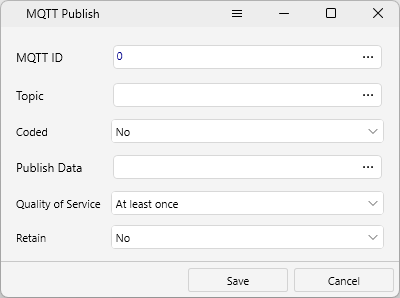
Parameters
- MQTT ID <numeric> - The identifier of the MQTT connection to use. This must match the Target MQTT ID used in MQTT Connect.
- Topic <string> - The topic to publish the message to (e.g.
sensors/temperature). - Coded <unquoted string> - Defines whether the payload is a Base64 encoded binary value:
- Yes - Publish Data is treated as Base64 encoded binary content and decoded before being sent.
- No - Publish Data is sent as a plain text payload.
- Publish Data <string> - The content of the message to publish.
- Quality of Service <unquoted string> - The QoS level used to deliver the message:
- At most once (QoS 0) - Message is sent once with no acknowledgment. It may be lost if the client or network fails.
- At least once (QoS 1) - Message is delivered at least once. Duplicates are possible.
- Exactly once (QoS 2) - Message is delivered exactly once. Slowest option but guarantees no loss or duplication.
- Retain <unquoted string> - Defines whether the broker keeps the message as the last known good value for the topic:
- Yes - The broker stores the message and delivers it to any new subscriber to this topic.
- No - The message is delivered only to currently subscribed clients.