Actions
In this tab, the actions settings are configured, as shown in the image.
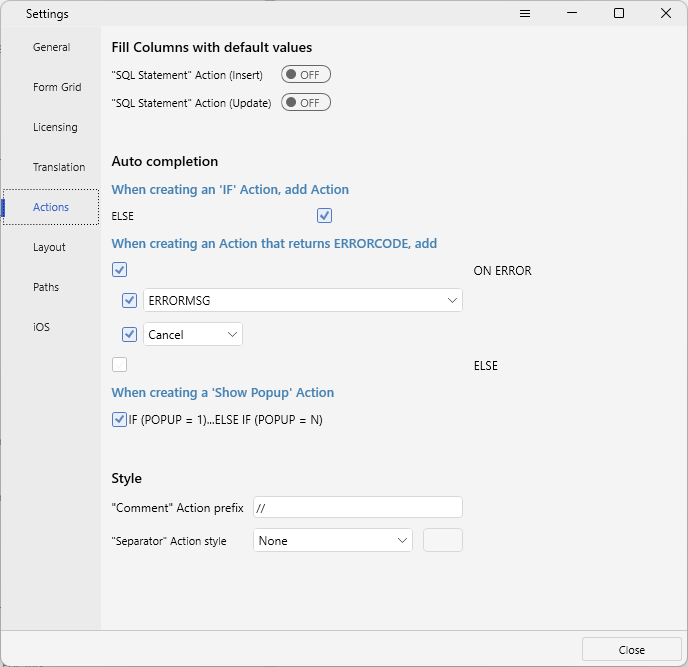
Fill Columns with default values:
- "SQL Statement" Action (insert) - Fill Colunms with default values.
- "SQL Statement" Action (update) - Fill Colunms with default values.
Auto completion
The Action Completion feature saves you time. It can be used in two cases. Each time you add an If Action, an Else can be automatically added (An End If is always added).
When you add an Action that can cause any kind of error, two Kalipso Keywords will be updated: ERRORCODE and ERRORMSG. So, after this kind of Actions, Kalipso can add Actions to manage the error. The dropdown below ON ERROR defines the error message added. It can be one of:
- ERRORMSG - Only the error message.
- "ERRORCODE: " +ERRORCODE +ENTER + "ERRORACTIONID: " +ERRORACTIONID +ENTER +ERRORMSG - The error code, the ID of the Action that failed and the error message, each in its own line.
- <Defined in Project> - The message defined in the Custom error Message property of each Project. See Project Properties - Other.
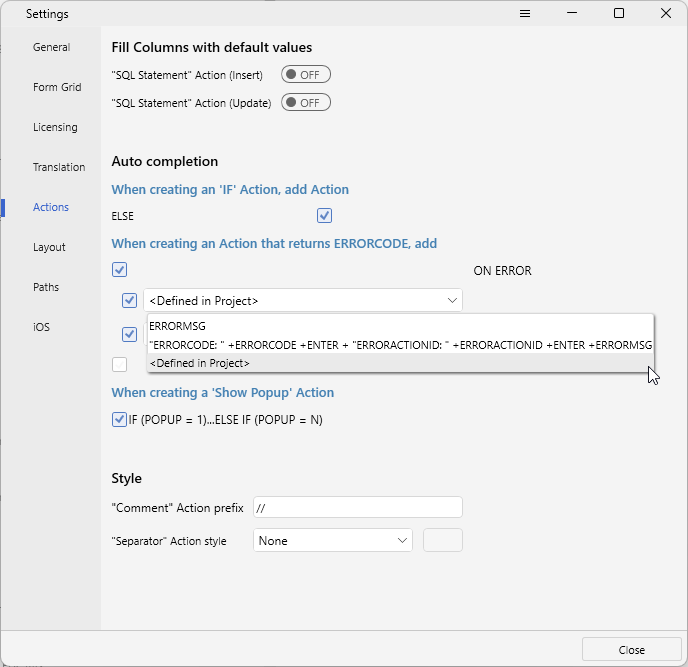
When you add a Show Popup Action, Kalipso can built the necessary Actions for you to evaluate the Popup's select option. Once added, these Actions can be edited as you wish.
To learn more about actions on Kalipso click here.
Style
- "Comment" Action prefix - Prefix Characters when adding a Comment action.
- "Separator" Action style - Separator style.