General
In this tab, the general settings are configured, as shown in the image.
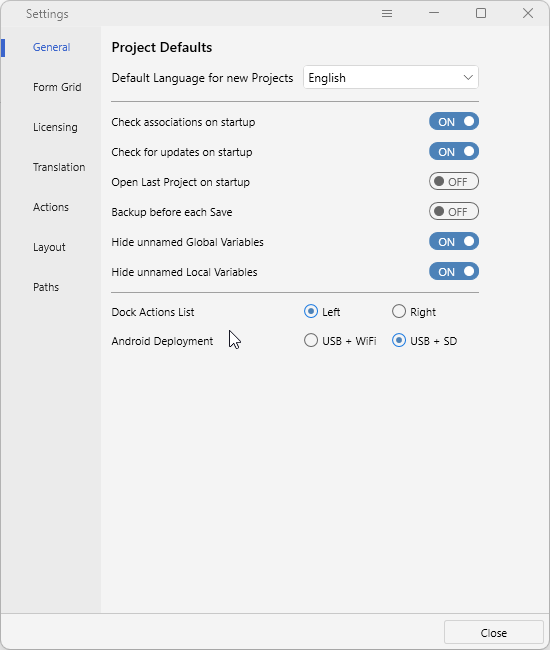
- Default Language for new Projects - Through a drop down menu you can access an area where you can choose, from a total of 126 languages, which language will be used in the project.
In the following options, only ask if you want to activate the indicated setting or not.
- Check associations on startup - Each time Kalipso starts, it can check if ‘.mfs’ files are associated with Kalipso Designer.
- Check for updates on startup - When Kalipso starts, it can check for updates.
- Open last Project on startup - Allows to open the last project.
- Backup before each Save - It’s highly recommended that you set Kalipso to backup your work. Before your Project is saved, Kalipso will save the physical ‘.mfs’ file in a .zip file, under the History folder of your Project folder. This way, you always have a version of your Project for each save.
- Hide unnamed Global Variables - A Kalipso project has about 1000 variables available. If you normally only use 10, you can give them a name to easily identify them. In Kalipso whenever you have to choose a variable, a list of 1000 appears, when in practice you only use 10. This parameter is used to hide those you don't use.
- Hide unnamed Local Variables - It has the same function as the previous option with the difference of applying only to local variables.
- Dock Actions list at - You can define if the Actions List has to be shown at the left or right of the Control Actions.
- Android Deployment - You can define the way you want to test your project in Android